
Rotating all images by 90 Degrees
for file in *.JPG; do convert $file -rotate 90 ninety-$file; done
Resizing images
mogrify -resize 1200×900 *.jpg
mogrify -verbose -resize ‘25%’ *.JPG
Removing meta data from images.
exiftool -all= *
Rotating all images by 90 Degrees
for file in *.JPG; do convert $file -rotate 90 ninety-$file; done
Resizing images
mogrify -resize 1200×900 *.jpg
mogrify -verbose -resize ‘25%’ *.JPG
Removing meta data from images.
exiftool -all= *
I followed this tutorial from Audacity. The results were good. I still need to put some efforts to achieve good results in basic editing.
https://manual.audacityteam.org/man/tutorial_vocal_removal_and_isolation.html
Results:
To make a custom potrait profile for your Project.
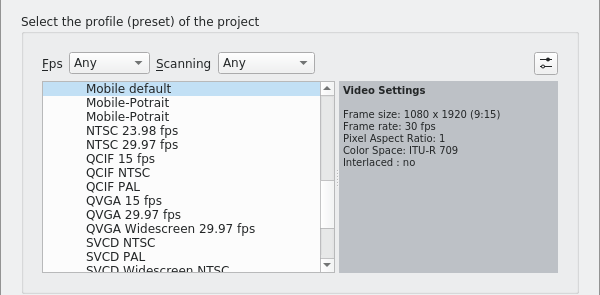
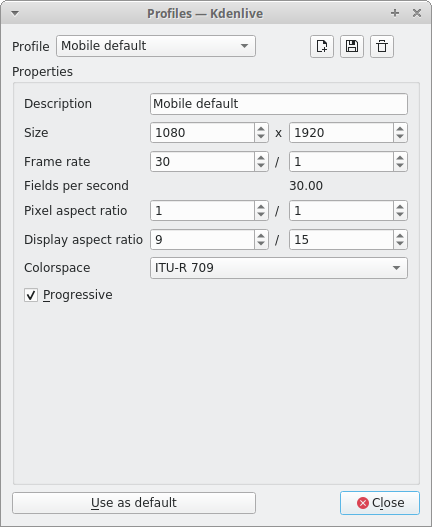
sudo apt-get update
sudo apt-get install ffmpeg
Settings -> Configure Kdenlive
or
Use the default short Control + Shift + ,
Add the binary path of ffmpeg.
Note: To find where ffmpeg has been installed in your machine.
whereis ffmpeg
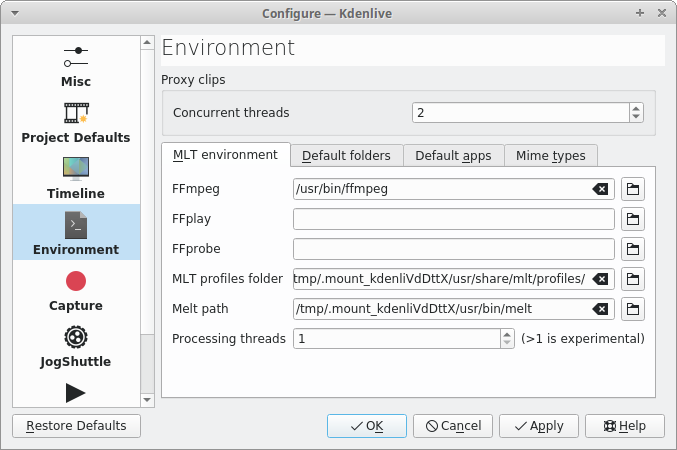
Error tag: Cannot process job. FFmpeg not found, please set path in Kdenlive’s settings Environment
Today, I read an illustrative guide on Participatory city.
It is a 20 Minute good read. I could relate a few things to my current living place especially the problems we faced in bringing participation in citizen science project in our local community. This problems were done and dusted, reading this have given new ways to tackle those recurring puny issues.
If I am planning on something next time, I will go through this wonderful illustrative guide.
To read: link
 fossindru